# Run Kubernetes on Windows
Recently Docker [announced](https://kubernetes.io/blog/2020/05/21/wsl-docker-kubernetes-on-the-windows-desktop/) an experimental feature on their Windows App, that allows us to run Kubernetes on [Windows Linux Subsystem](https://docs.microsoft.com/en-us/windows/wsl/wsl2-index). Here's a high-level overview of how to do it:
1. Install WSL2 by following the official [installation guide](https://docs.microsoft.com/en-us/windows/wsl/install).
> WSL 2 is a new version of the architecture in WSL that changes how Linux distributions interact with Windows
If you are like me and try to use the Windows Store to install WSL, you end up with the first version of WSL installed.
I had to join the [Windows Insider Program](https://insider.windows.com/en/), update my windows version, and
follow the steps to [Update from WSL 1 to WSL 2](https://docs.microsoft.com/en-us/windows/wsl/install-win10#update-to-wsl-2).
2. Install Docker desktop for windows by following the official [installation guide](https://www.docker.com/products/docker-desktop)
3. Enable the WSL2 based engine on the settings:

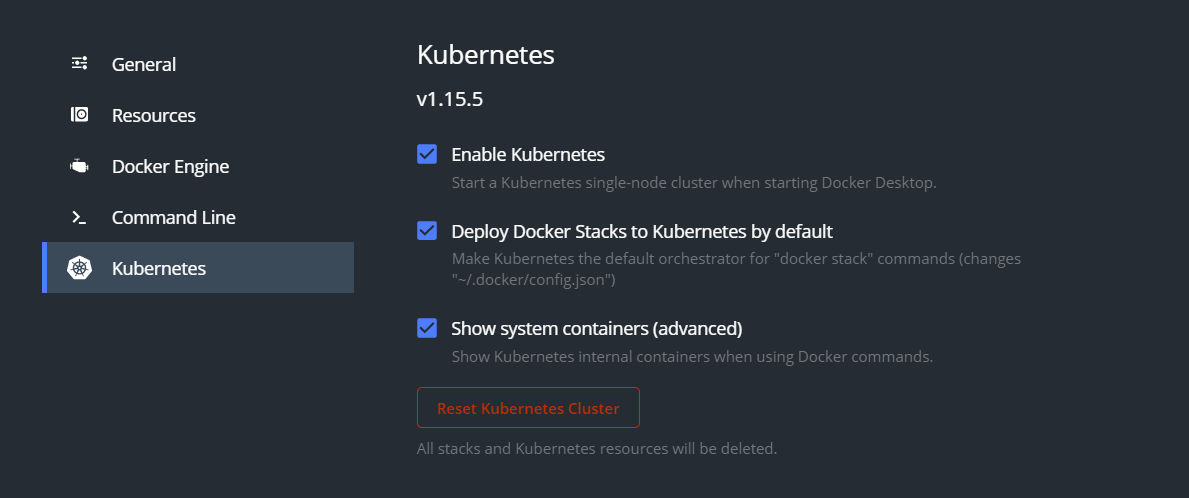
4. Enable Kubernetes
5. Open the terminal on the Linux subsystem and [install kubectl](https://kubernetes.io/docs/tasks/tools/install-kubectl/).
```bash
curl -LO https://storage.googleapis.com/kubernetes-release/release/$(curl -s https://storage.googleapis.com/kubernetes-release/release/stable.txt)/bin/linux/amd64/kubectl \
&& chmod +x ./kubectl \
&& sudo mv ./kubectl /usr/local/bin/kubectl
```
6. Get the configuration for the Kubernetes cluster from the Windows file system